> For the complete documentation index, see [llms.txt](https://docs.tcmenu.cc/llms.txt). Markdown versions of documentation pages are available by appending `.md` to page URLs; this page is available as [Markdown](https://docs.tcmenu.cc/dao-zei-zhi-hai-sot/aggressive-jiao-cheng/agg-shi-yong-jiao-cheng.md).

# AGG使用教程

## 注入前设置 <a href="#zhu-ru-qian-she-zhi" id="zhu-ru-qian-she-zhi"></a>

{% hint style="danger" %} <mark style="color:red;">**电脑设置:**</mark>

<mark style="color:red;">**卸载电脑里的所有**</mark><mark style="color:red;">**`杀毒`**</mark><mark style="color:red;">**软件(**</mark>~~<mark style="color:red;">**电脑管家 360 鲁大师**</mark>~~<mark style="color:red;">**&#x20;**</mark><mark style="color:red;">**等等)**</mark>

<mark style="color:red;">**关闭电脑里的**</mark><mark style="color:red;">**`自带杀毒/防火墙/安全中心`**</mark>

<mark style="color:red;">**卸载**</mark><mark style="color:red;">**&#x20;**</mark><mark style="color:red;">**`Faceit`**</mark><mark style="color:red;">**反作弊 和 瓦洛兰特反作弊**</mark><mark style="color:red;">**`(Valorant Anti-Cheat)`**</mark>

<mark style="color:red;">**禁用**</mark><mark style="color:red;">**`虚拟化`**</mark>

<mark style="color:red;">**关闭所有的**</mark><mark style="color:red;">**`其余覆盖`**</mark><mark style="color:red;">**:包括**</mark><mark style="color:red;">**`N卡覆盖`**</mark><mark style="color:red;">**，**</mark><mark style="color:red;">**`OBS录屏`**</mark>

<mark style="color:red;">**`菜单相关的文件夹路径不能为中文`**</mark>

<mark style="color:red;">**`如果你电脑里有调试软件,务必先卸载后再注入,否则你的HWID会被锁定`**</mark>

<mark style="color:red;">**下载Discord设置**</mark><mark style="color:red;">**`游戏内覆盖`**</mark>

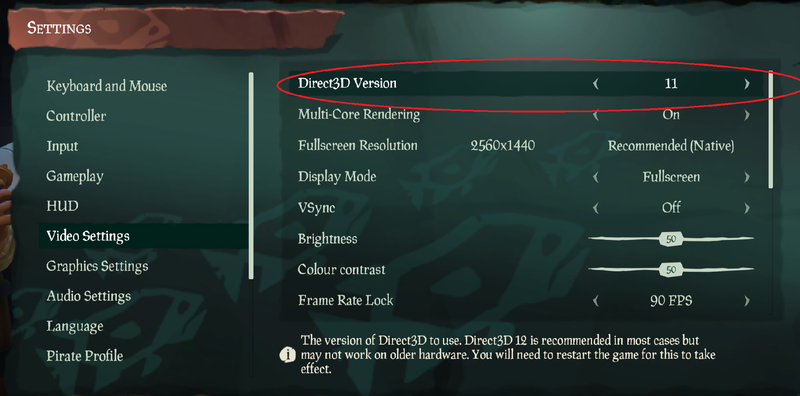
<mark style="color:red;">**游戏设置：**</mark>

<mark style="color:red;">**`Direct3D`**</mark><mark style="color:red;">**设置**</mark><mark style="color:red;">**`11`**</mark>
{% endhint %}

<figure><img src="https://content.gitbook.com/content/FDive0muGSxachpRYk3V/blobs/oG1pBAND4LS44orQMooQ/image.png" alt=""><figcaption></figcaption></figure>

## Discord覆盖 <a href="#zhu-ce" id="zhu-ce"></a>

### 下载Disocrd

{% embed url="<https://discord.com/>" %}

{% hint style="danger" %} <mark style="color:red;">**Discord必须**</mark><mark style="color:red;">**`正在运行`**</mark><mark style="color:red;">**,然后需**</mark><mark style="color:red;">**`开启`**</mark><mark style="color:red;">**以下设置**</mark>
{% endhint %}

<figure><img src="https://2096864887-files.gitbook.io/~/files/v0/b/gitbook-x-prod.appspot.com/o/spaces%2FFDive0muGSxachpRYk3V%2Fuploads%2FHdAwET339KajvCEGxULD%2F%E6%9C%AA%E6%A0%87%E9%A2%98-1_34.jpg?alt=media&amp;token=1707e1b7-fe0a-4bfb-876f-d852654e35ff" alt=""><figcaption></figcaption></figure>

<figure><img src="https://2096864887-files.gitbook.io/~/files/v0/b/gitbook-x-prod.appspot.com/o/spaces%2FFDive0muGSxachpRYk3V%2Fuploads%2FdeQgef3mvinV8sxsM75l%2F%E6%9C%AA%E6%A0%87%E9%A2%98-1_10.jpg?alt=media&amp;token=d56588b6-70f6-4e71-b490-7e6cc625bd46" alt=""><figcaption></figcaption></figure>

> **若无法使用Discord，请查看下方教程**

{% content-ref url="/pages/RotE2zhqAnO7ZcSeuGgc" %}
[Discord无限转圈/无法更新 解决方案](/qi-ta-jiao-cheng/za-yi-jiao-cheng/discord-wu-xian-zhuan-quan-wu-fa-geng-xin-jie-jue-fang-an.md)
{% endcontent-ref %}

{% hint style="info" %} <mark style="color:blue;">**如果你有**</mark><mark style="color:blue;">**`多个Windows帐户`**</mark><mark style="color:blue;">**,那么你只需要使用**</mark><mark style="color:blue;">**`具有管理权限的Windows帐户进行注入`**</mark><mark style="color:blue;">**即可**</mark>
{% endhint %}

## 下载注册 <a href="#zhu-ce" id="zhu-ce"></a>

{% embed url="<https://tcmenu.lanzouw.com/b0knk3a5c>" %}

{% hint style="danger" %} <mark style="color:red;">**必须以**</mark><mark style="color:red;">**`管理员`**</mark><mark style="color:red;">**方式启动注入器**</mark>
{% endhint %}

<figure><img src="https://2096864887-files.gitbook.io/~/files/v0/b/gitbook-x-prod.appspot.com/o/spaces%2FFDive0muGSxachpRYk3V%2Fuploads%2FNPKeOIJnsjpCVjLfUm8z%2F%E6%9C%AA%E6%A0%87%E9%A2%98-1_21.jpg?alt=media&amp;token=26c54e1f-d639-42f7-99cc-18e572e19567" alt=""><figcaption></figcaption></figure>

<figure><img src="https://2096864887-files.gitbook.io/~/files/v0/b/gitbook-x-prod.appspot.com/o/spaces%2FFDive0muGSxachpRYk3V%2Fuploads%2FCHFlXGNmvJxxKMMMrpwI%2F%E6%9C%AA%E6%A0%87%E9%A2%98-1_06.jpg?alt=media&amp;token=55ae6782-bccc-4c53-83e5-34a3b1795d59" alt=""><figcaption></figcaption></figure>

<figure><img src="https://2096864887-files.gitbook.io/~/files/v0/b/gitbook-x-prod.appspot.com/o/spaces%2FFDive0muGSxachpRYk3V%2Fuploads%2FeLIR0CjuzvGdq69pqCqO%2F%E6%9C%AA%E6%A0%87%E9%A2%98-1_22.jpg?alt=media&amp;token=45aa780f-a12d-4816-9c28-7a27176fc3ec" alt=""><figcaption></figcaption></figure>

<figure><img src="https://2096864887-files.gitbook.io/~/files/v0/b/gitbook-x-prod.appspot.com/o/spaces%2FFDive0muGSxachpRYk3V%2Fuploads%2FjUBQQSfGfgS3Xy5wsCsO%2F%E6%9C%AA%E6%A0%87%E9%A2%98-1_30.gif?alt=media&amp;token=573d6204-59e8-4eb0-8079-b05d4ec421ed" alt=""><figcaption></figcaption></figure>

<figure><img src="https://2096864887-files.gitbook.io/~/files/v0/b/gitbook-x-prod.appspot.com/o/spaces%2FFDive0muGSxachpRYk3V%2Fuploads%2FGCSibFM0gJ5DiCzo1hgp%2F%E6%9C%AA%E6%A0%87%E9%A2%98-1_16.jpg?alt=media&amp;token=b0f5fb10-8d9c-433e-8598-a1a464cbf672" alt=""><figcaption></figcaption></figure>

## 注入 <a href="#zhu-ru" id="zhu-ru"></a>

**如果你有**<mark style="color:red;">**`多个Windows帐户`**</mark>**,那么你只需要使用**<mark style="color:red;">**`具有管理权限的Windows帐户进行注入`**</mark>**即可**

**管理员运行注入器后**

**输入你**<mark style="color:red;">**`注册的信息`**</mark>**并**<mark style="color:red;">**`登录`**</mark>**,然后**<mark style="color:red;">**`注入`**</mark>**即可**<br>

<figure><img src="https://2096864887-files.gitbook.io/~/files/v0/b/gitbook-x-prod.appspot.com/o/spaces%2FFDive0muGSxachpRYk3V%2Fuploads%2FznOdOXa73ja3MGBZcfwv%2F%E6%9C%AA%E6%A0%87%E9%A2%98-1_14.jpg?alt=media&amp;token=7b946504-e489-464b-a9e2-277904ef4a23" alt=""><figcaption></figcaption></figure>

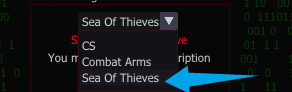
**然后选择你的**<mark style="color:red;">**`对应游戏`**</mark><br>

<figure><img src="https://content.gitbook.com/content/FDive0muGSxachpRYk3V/blobs/GxAx2kRgYTjOXQ7hez10/image.png" alt=""><figcaption></figcaption></figure>

**然后里面有**<mark style="color:red;">**`BYBASS`**</mark>**的绕过选项**<br>

<figure><img src="https://2096864887-files.gitbook.io/~/files/v0/b/gitbook-x-prod.appspot.com/o/spaces%2FFDive0muGSxachpRYk3V%2Fuploads%2Fq5yYGPI4SUlSMVhlHg3Z%2F%E6%9C%AA%E6%A0%87%E9%A2%98-1_24.jpg?alt=media&amp;token=cfdc0411-c01b-4b88-9ab2-9caff9b5ea9d" alt=""><figcaption></figcaption></figure>

**之后进入游戏后**<mark style="color:red;">**`Discord提示覆盖`**</mark>**后就可以点击Load了**

<figure><img src="https://2096864887-files.gitbook.io/~/files/v0/b/gitbook-x-prod.appspot.com/o/spaces%2FFDive0muGSxachpRYk3V%2Fuploads%2F1KF6Nz2wTPRwNNa3DDxR%2F%E6%9C%AA%E6%A0%87%E9%A2%98-1_03.jpg?alt=media&amp;token=29bae4e6-0aea-44db-a043-ebeacc948d2b" alt=""><figcaption></figcaption></figure>

<figure><img src="https://2096864887-files.gitbook.io/~/files/v0/b/gitbook-x-prod.appspot.com/o/spaces%2FFDive0muGSxachpRYk3V%2Fuploads%2F71gqY5vYr1eP9wOrdkxp%2F%E6%9C%AA%E6%A0%87%E9%A2%98-1_36.jpg?alt=media&amp;token=068afe75-30d3-4f97-b313-b4e0acdc4cc8" alt=""><figcaption></figcaption></figure>

### **使用** <a href="#shi-yong" id="shi-yong"></a>

**点击 `INS` 呼出/隐藏菜单**

**`鼠标点击` 操控菜单**