> For the complete documentation index, see [llms.txt](https://docs.tcmenu.cc/llms.txt). Markdown versions of documentation pages are available by appending `.md` to page URLs; this page is available as [Markdown](https://docs.tcmenu.cc/dma/dma-jiao-cheng/kmbox-jiao-cheng.md).

# KMbox教程

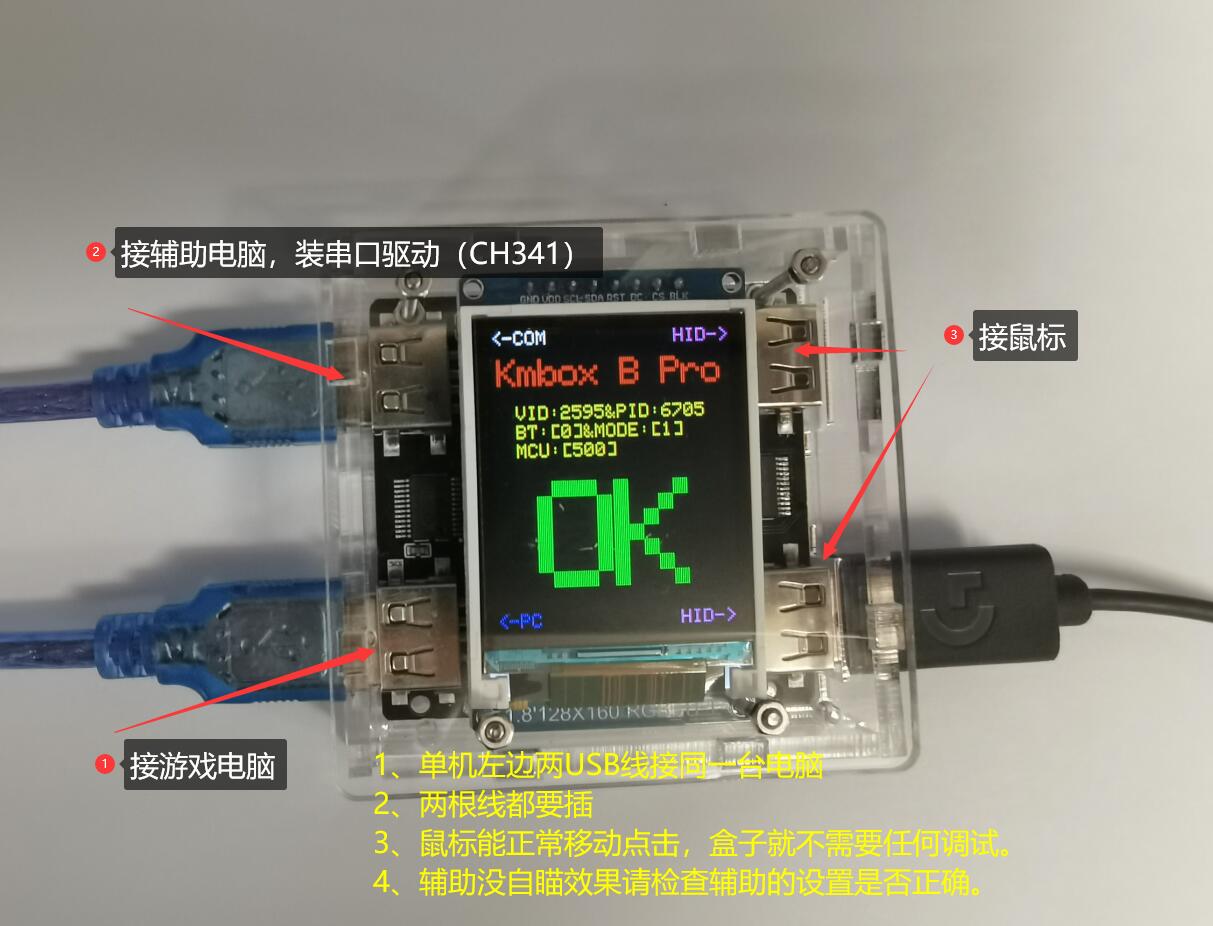
## **KMBOXB+ 也就是 KMBOX B pro** <a href="#kmboxbkmboxbpro" id="kmboxbkmboxbpro"></a>

<figure><img src="/files/aTeTbEJO6eQOCWrDlXaK" alt=""><figcaption></figcaption></figure>

按图示接线后在辅机安装驱动[CH341SER B系列通用串口驱动.rar](https://cxki8nd1uva.feishu.cn/file/GiGkbr1p2o020Kx4vhbc5G5PncY)

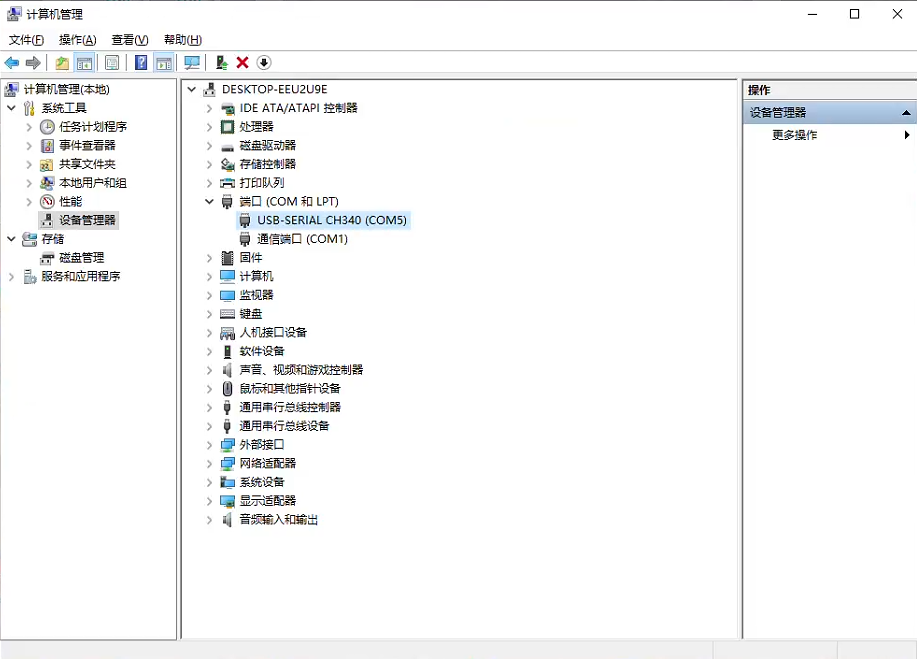
如何查看KMbox的COM口：辅机设备管理器-端口一栏，CH340后面括号里面即COM口编号。<br>

<figure><img src="/files/LA7Gir1KaPj7bc94CyKU" alt=""><figcaption></figcaption></figure>

KMBOX百科全书 [kmbox用户手册 版本20230307.pdf](https://cxki8nd1uva.feishu.cn/file/BctNbb6bMojYYkxD2INchoARnYf)

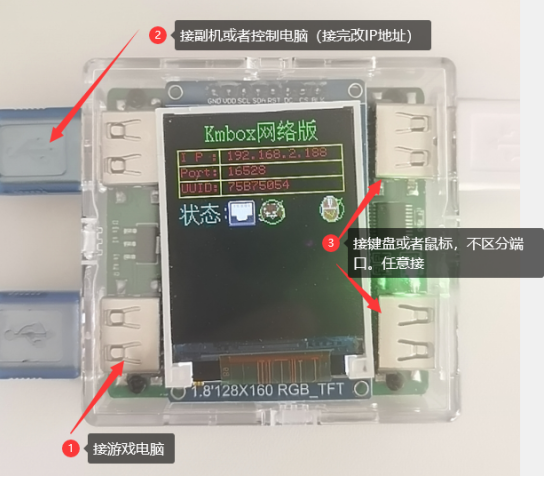
## **KMBOX net** <a href="#kmboxnet" id="kmboxnet"></a>

按下图所示接线：<br>

<figure><img src="/files/IqBgUCuCU4D68NlPkm3X" alt=""><figcaption></figcaption></figure>

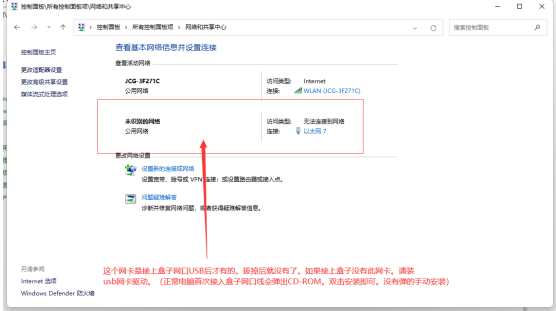
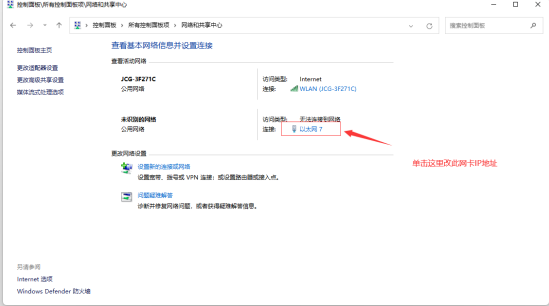
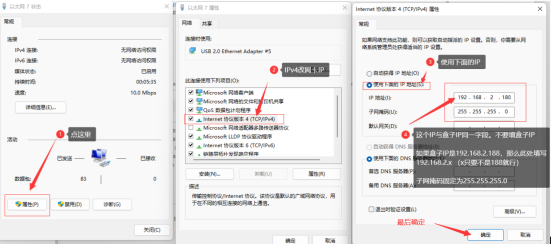
修改电脑IP，确保与盒子同一网段。

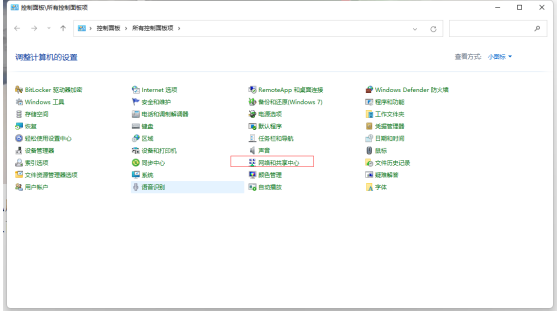
按照上面图接好线后。电脑会出现一个网卡。<br>

<figure><img src="/files/gRrADX7iE9vc9HDZ0UcY" alt=""><figcaption></figcaption></figure>

<figure><img src="/files/JJ4QOGHlrh5MLFwlbvmY" alt=""><figcaption></figcaption></figure>

<figure><img src="/files/I93gXm9CcQYOt6Khdh92" alt=""><figcaption></figcaption></figure>

<figure><img src="/files/TpR4zEu0Q3M6QgkFrQVu" alt=""><figcaption></figcaption></figure>

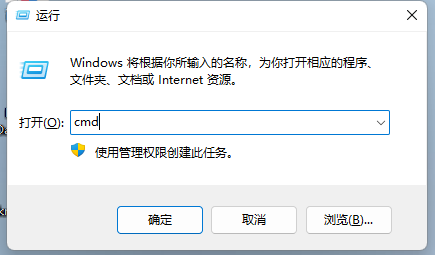
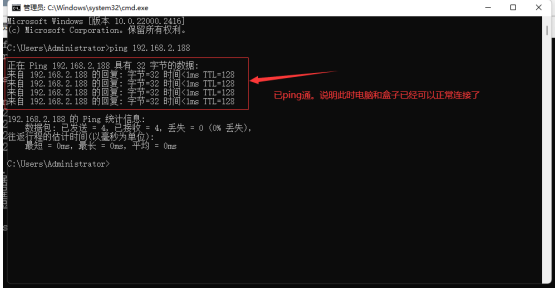
确定后ping一下能否正常连接盒子。

<figure><img src="/files/Hv3OED9ZkaDAUelmCvbx" alt=""><figcaption></figcaption></figure>

<figure><img src="/files/WuS5Y3kNS2D8pq8z68Wc" alt=""><figcaption></figcaption></figure>

到此盒子连接已完成。


---

# Agent Instructions
This documentation is published with GitBook. GitBook is the documentation platform designed so that both humans and AI agents can read, navigate, and reason over technical content effectively. Learn more at gitbook.com.

## Querying This Documentation
If you need additional information that is not directly available in this page, you can query the documentation dynamically by asking a question.

Perform an HTTP GET request on the current page URL with the `ask` query parameter, and the optional `goal` query parameter:

```
GET https://docs.tcmenu.cc/dma/dma-jiao-cheng/kmbox-jiao-cheng.md?ask=<question>&goal=<endgoal>
```

`ask` is the immediate question: it should be specific, self-contained, and written in natural language.
`goal` is optional and describes the broader end goal you are ultimately trying to accomplish on behalf of the user. GitBook uses it to tailor the answer towards what is most useful for that goal.

The response will contain a direct answer to the question and relevant excerpts and sources from the documentation.

Use this mechanism when the answer is not explicitly present in the current page, you need clarification or additional context, or you want to retrieve related documentation sections.