# 21Pro 安装注入教程

### **注入2Take1**

> **注入2Take1成功后并进入线上模式后,打开菜单-**<mark style="color:red;">**`脚本选项`**</mark>**-**<mark style="color:red;">**`全局受信模式`**</mark>**(里面的功能全打开）**
>
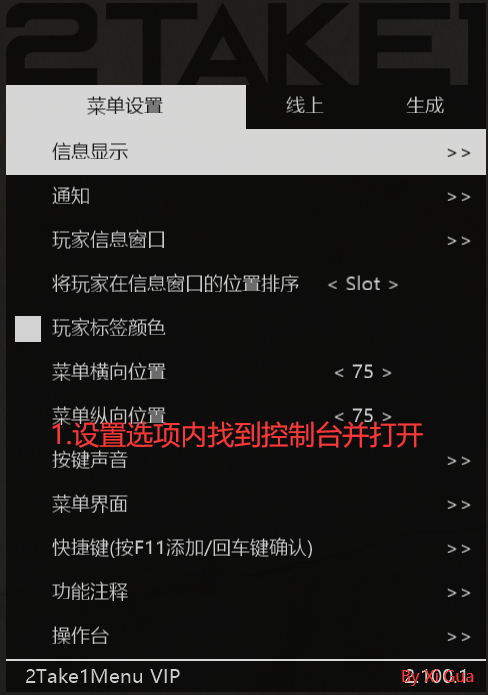
> <mark style="color:red;">**`设置选项`**</mark>**内-**<mark style="color:red;">**`控制台`**</mark>**-**<mark style="color:red;">**`开启控制台`**</mark>
>
> **然后会弹出来一个框框,正常现象**

<figure><img src="/files/4EJcV5yGzseOUfZt1uE5" alt=""><figcaption></figcaption></figure>

> **`绑定时,需注意电脑不可以登录多个QQ,只登录你需要绑定QQ即可`**
>
> **2022.11.21之后,21Pro需要绑定`QQ`才可以注入,详情查看**

---

# Agent Instructions: Querying This Documentation

If you need additional information that is not directly available in this page, you can query the documentation dynamically by asking a question.

Perform an HTTP GET request on the current page URL with the `ask` query parameter:

```
GET https://docs.tcmenu.cc/gta5-cai-dan-jiao-cheng/2take1-jiao-cheng/21pro-an-zhuang-zhu-ru-jiao-cheng.md?ask=<question>
```

The question should be specific, self-contained, and written in natural language.
The response will contain a direct answer to the question and relevant excerpts and sources from the documentation.

Use this mechanism when the answer is not explicitly present in the current page, you need clarification or additional context, or you want to retrieve related documentation sections.
