# 2Take1使用教程

> #### 注册账号 <a href="#zhu-ce-zhang-hao" id="zhu-ce-zhang-hao"></a>

**进入2take1官网：**[**点我进入**](https://2take1.menu/login)**​**

![](https://2492540120-files.gitbook.io/~/files/v0/b/gitbook-x-prod.appspot.com/o/spaces%2FvGFcRTH677QmdeZg8dMA%2Fuploads%2FoQ6Ckg5kww17iOO61DgW%2F1.png?alt=media\&token=9ba1b718-4329-45b4-99e9-b29be80ac90b)

**注册时建议使用英文或数字 （不要使用中文及特殊符号 否则可能导致注册/注入不了）**

![](https://2492540120-files.gitbook.io/~/files/v0/b/gitbook-x-prod.appspot.com/o/spaces%2FvGFcRTH677QmdeZg8dMA%2Fuploads%2FKuRwBRn450QNMeP3Wn5a%2F2.png?alt=media\&token=488a4f4c-7758-4e86-87a3-193e6d10312d)

![](https://2492540120-files.gitbook.io/~/files/v0/b/gitbook-x-prod.appspot.com/o/spaces%2FvGFcRTH677QmdeZg8dMA%2Fuploads%2FvSVzreYKrlrl1ft1qPF5%2F3.png?alt=media\&token=dbce3360-64fb-4f4e-87fb-3150abf2fc24)

#### 点击邮件中的链接 验证邮箱地址 <a href="#dian-ji-you-jian-zhong-de-lian-jie-yan-zheng-you-xiang-di-zhi" id="dian-ji-you-jian-zhong-de-lian-jie-yan-zheng-you-xiang-di-zhi"></a>

![](https://2492540120-files.gitbook.io/~/files/v0/b/gitbook-x-prod.appspot.com/o/spaces%2FvGFcRTH677QmdeZg8dMA%2Fuploads%2FKia9eWg75zklEnoFLIcS%2F4.png?alt=media\&token=51acc7c4-d595-4952-954e-2c21157270ff)

**检查你的邮件收件箱中是否有消息（可能在垃圾信箱），然后单击内部连接以验证你的电子邮件地址**

![](https://2492540120-files.gitbook.io/~/files/v0/b/gitbook-x-prod.appspot.com/o/spaces%2FvGFcRTH677QmdeZg8dMA%2Fuploads%2FY1XtaZ4Pra0EPEw4MmhE%2F1.png?alt=media\&token=6342d755-e7d3-48cb-a852-6b047210705e)

![](https://2492540120-files.gitbook.io/~/files/v0/b/gitbook-x-prod.appspot.com/o/spaces%2FvGFcRTH677QmdeZg8dMA%2Fuploads%2FWi7c0AYEEoNCpt3mLSxg%2F2.png?alt=media\&token=251e4063-ad35-4817-a0ce-aade9fa9b25c)

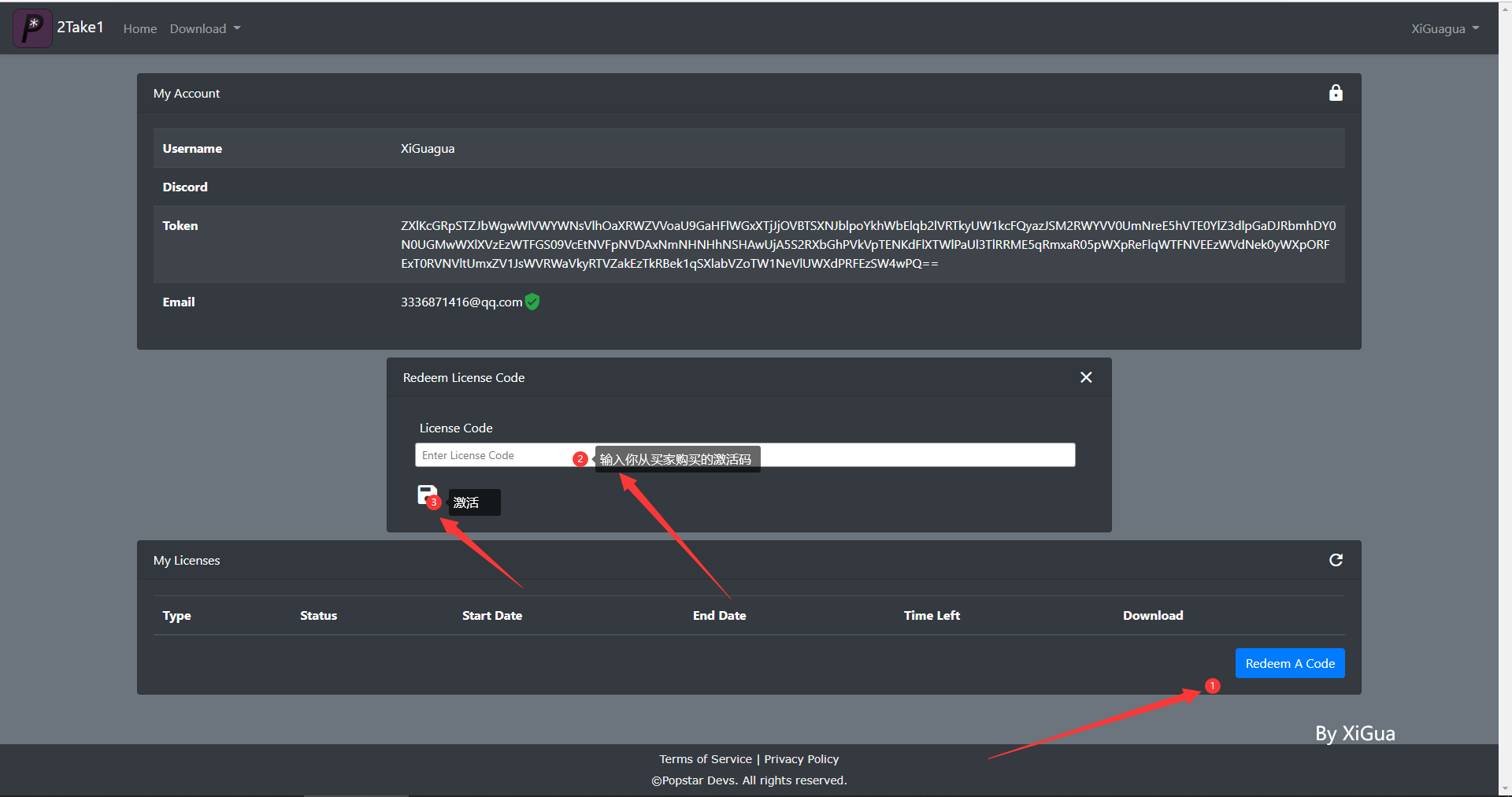
#### **激活** <a href="#ji-huo" id="ji-huo"></a>

![](https://2492540120-files.gitbook.io/~/files/v0/b/gitbook-x-prod.appspot.com/o/spaces%2FvGFcRTH677QmdeZg8dMA%2Fuploads%2FUN1SVFPSLPUAMmZuoOA7%2F3.png?alt=media\&token=20599759-6c71-48ad-8897-559ea7eabb68)

![](https://2492540120-files.gitbook.io/~/files/v0/b/gitbook-x-prod.appspot.com/o/spaces%2FvGFcRTH677QmdeZg8dMA%2Fuploads%2FSQ0HjJL5zi8itsKRUbGn%2F4.png?alt=media\&token=e73eb48f-7076-4461-ad87-b687a2a9320b)

**激活后，账户里面就可以显示激活信息（请区分7天/40天/永久）防止被骗**

> **安装2Take1**

**下载2T注入器**

![](https://2492540120-files.gitbook.io/~/files/v0/b/gitbook-x-prod.appspot.com/o/spaces%2FvGFcRTH677QmdeZg8dMA%2Fuploads%2FMpBQCsoMOvLbFCKENGIa%2F2.png?alt=media\&token=6696c12b-333c-4028-b883-b274fccf32d6)

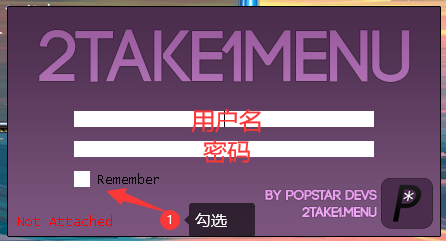
#### 输入你的账户密码 完成后按下回车/Ent键 <a href="#shu-ru-ni-de-zhang-hu-mi-ma-wan-cheng-hou-an-xia-hui-che-ent-jian" id="shu-ru-ni-de-zhang-hu-mi-ma-wan-cheng-hou-an-xia-hui-che-ent-jian"></a>

![](https://2492540120-files.gitbook.io/~/files/v0/b/gitbook-x-prod.appspot.com/o/spaces%2FvGFcRTH677QmdeZg8dMA%2Fuploads%2FoRAylmm96Gmy1HCFnchq%2F1.png?alt=media\&token=85b8efa2-6b9d-4be0-8ef2-6b6efa53d0ff)

![](https://2492540120-files.gitbook.io/~/files/v0/b/gitbook-x-prod.appspot.com/o/spaces%2FvGFcRTH677QmdeZg8dMA%2Fuploads%2FAUY4IMAqaZVZnN7Tfgkv%2F2.png?alt=media\&token=5726af23-3b7d-4969-a951-004e85a145c2)

​

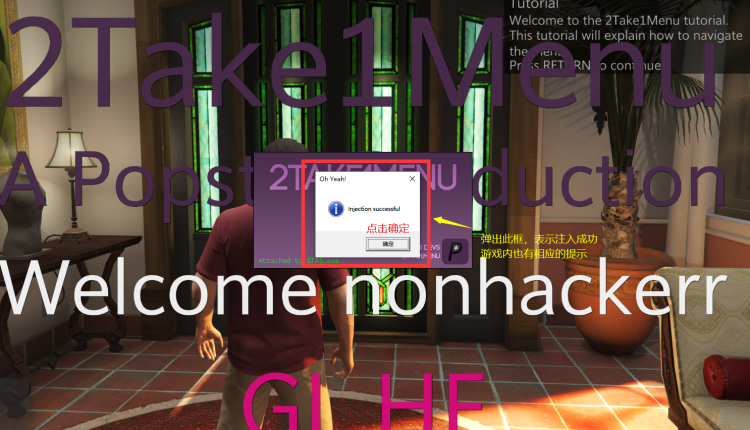
> #### 进入故事模式 点击 INJECT <a href="#jin-ru-gu-shi-mo-shi-dian-ji-inject" id="jin-ru-gu-shi-mo-shi-dian-ji-inject"></a>

​

#### 如若注入失败 <a href="#ru-ruo-zhu-ru-shi-bai" id="ru-ruo-zhu-ru-shi-bai"></a>

> **​**

**查看以下教程,注入成功无视此条​**

🛤菜单注入闪退和自崩问题

**成功无视上条**

![](https://2492540120-files.gitbook.io/~/files/v0/b/gitbook-x-prod.appspot.com/o/spaces%2FvGFcRTH677QmdeZg8dMA%2Fuploads%2FNlGAWPEjuFAeSSKCAvh4%2F1.png?alt=media\&token=e626a194-d014-44d4-833d-458708647c82)

![](https://2492540120-files.gitbook.io/~/files/v0/b/gitbook-x-prod.appspot.com/o/spaces%2FvGFcRTH677QmdeZg8dMA%2Fuploads%2FPZecWlcewRU7jssaVt3R%2F2.png?alt=media\&token=d722c8db-25da-4014-b917-a38a372dba74)

![](https://2492540120-files.gitbook.io/~/files/v0/b/gitbook-x-prod.appspot.com/o/spaces%2FvGFcRTH677QmdeZg8dMA%2Fuploads%2FsaW5ecWyc8WE65VyUK3J%2F111.png?alt=media\&token=af36cb43-62d3-41a3-b989-a1ae802b786c)

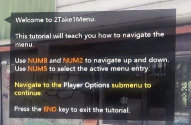
### 注：出现上述提示按END退出即可 <a href="#zhu-chu-xian-shang-shu-ti-shi-an-end-tui-chu-ji-ke" id="zhu-chu-xian-shang-shu-ti-shi-an-end-tui-chu-ji-ke"></a>

### 按键说明 <a href="#an-jian-shuo-ming" id="an-jian-shuo-ming"></a>

**`-` 呼出/隐藏菜单**

**小键盘`8`** **`2` 控制上下**

**小键盘`4`** **`6` 控制左右**

**小键盘`5` 确定； `0` 返回**

**小键盘`7/9` 切换分栏**

**新手教程按`回车/Ent`键关闭**


---

# Agent Instructions: Querying This Documentation

If you need additional information that is not directly available in this page, you can query the documentation dynamically by asking a question.

Perform an HTTP GET request on the current page URL with the `ask` query parameter:

```
GET https://docs.tcmenu.cc/gta5-cai-dan-jiao-cheng/2take1-jiao-cheng/2take1-shi-yong-jiao-cheng.md?ask=<question>
```

The question should be specific, self-contained, and written in natural language.
The response will contain a direct answer to the question and relevant excerpts and sources from the documentation.

Use this mechanism when the answer is not explicitly present in the current page, you need clarification or additional context, or you want to retrieve related documentation sections.