> For the complete documentation index, see [llms.txt](https://docs.tcmenu.cc/llms.txt). Markdown versions of documentation pages are available by appending `.md` to page URLs; this page is available as [Markdown](https://docs.tcmenu.cc/gta5-cai-dan-jiao-cheng/jeff-jie-fu-jiao-cheng/jf-shi-yong-jiao-cheng.md).

# JF使用教程

### 注册 <a href="#zhu-ce" id="zhu-ce"></a>

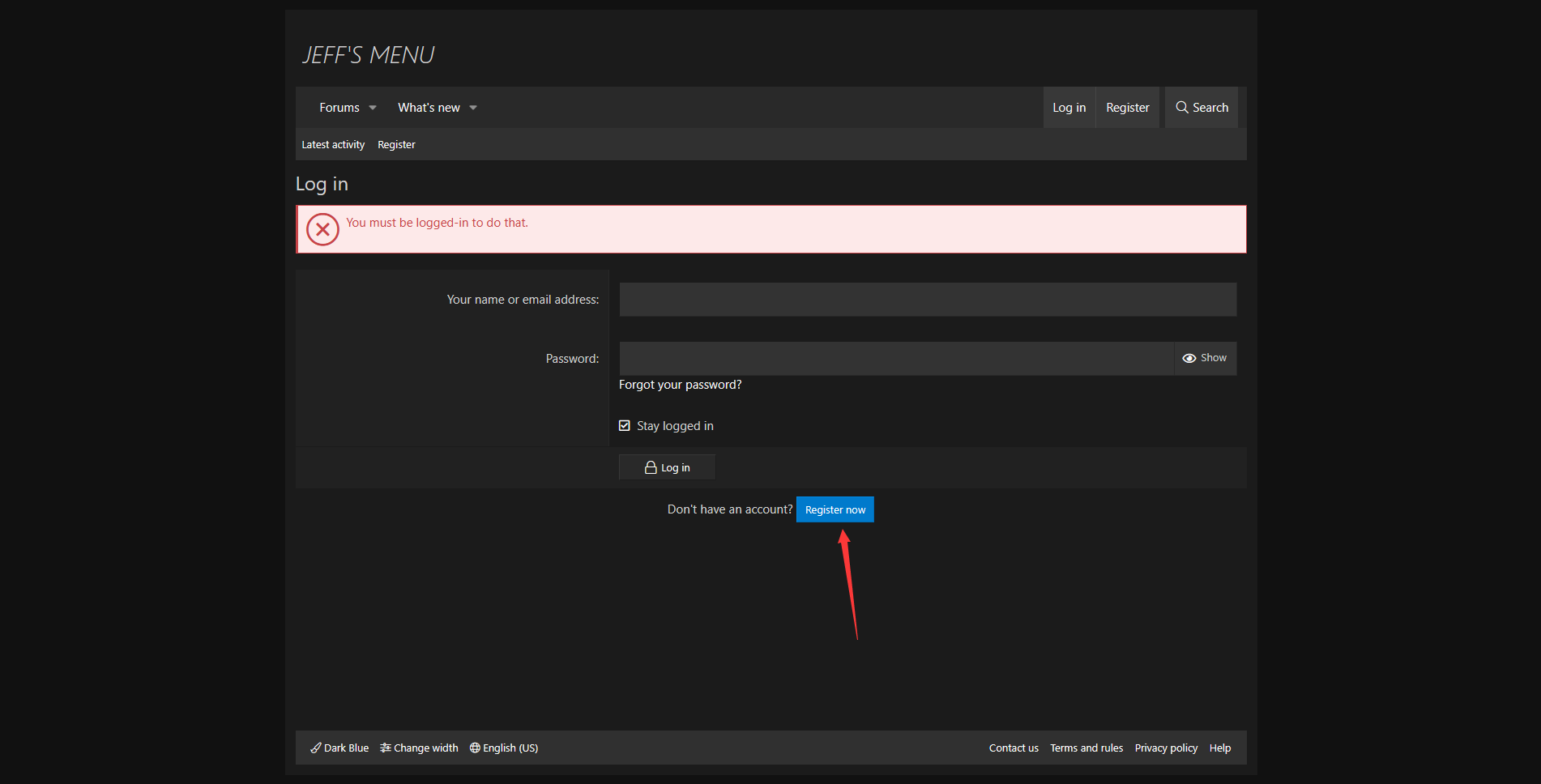
**进入JF官网：**

[**https://jeffsmenu.com**](https://jeffsmenu.com/)

**注册的时候不能有中文跟特殊字符，不然会注册/注入不了**

**如图操作：**

**点击`Register`进行注册**

<img src="https://2492540120-files.gitbook.io/~/files/v0/b/gitbook-x-prod.appspot.com/o/spaces%2FvGFcRTH677QmdeZg8dMA%2Fuploads%2FmW9TptGdAlqfMD7W9Raa%2F%7DPJUKAM%7BYZ%7DLD%7B7(F%60BTR~L.png?alt=media&#x26;token=639a095a-8e37-4cc5-a6e2-f7f34ce89b2f" alt="" width="100%">

<img src="https://2492540120-files.gitbook.io/~/files/v0/b/gitbook-x-prod.appspot.com/o/spaces%2FvGFcRTH677QmdeZg8dMA%2Fuploads%2Ftoy7jLZDKBcfq7GbXFNt%2F~1198%7B54CJP7M9W%5D%245%24MZEY.png?alt=media&#x26;token=7b33ac2f-6751-4e82-9292-b69e5fe4d11a" alt="" width="100%">

<img src="https://2492540120-files.gitbook.io/~/files/v0/b/gitbook-x-prod.appspot.com/o/spaces%2FvGFcRTH677QmdeZg8dMA%2Fuploads%2FgDHTuSJk7w54OWh4iWAH%2FPKRJ9%60CFDU%7B68JC%255DKJBG1.png?alt=media&#x26;token=8f587e8f-56a5-4857-8253-39cedfd6198c" alt="" width="100%">

<img src="https://2492540120-files.gitbook.io/~/files/v0/b/gitbook-x-prod.appspot.com/o/spaces%2FvGFcRTH677QmdeZg8dMA%2Fuploads%2F0ID1tYzKiGXvOozqWYC5%2F7O%5B%25F225%24%24%5B%7B%7BTPK9N4%600TY.png?alt=media&#x26;token=b39cccdc-f5d3-4f20-aaae-808c3556b452" alt="" width="100%">

### 下载 <a href="#xia-zai" id="xia-zai"></a>

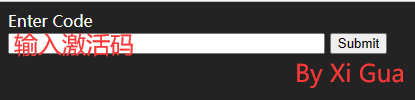
**售后群下载JF文件**

<img src="https://2492540120-files.gitbook.io/~/files/v0/b/gitbook-x-prod.appspot.com/o/spaces%2FvGFcRTH677QmdeZg8dMA%2Fuploads%2Fu5L7hRxNkyjDu4vi4nvO%2FFUX%40S%5BY1AZHH5NR8I2T895A.png?alt=media&#x26;token=3de3048b-9979-43ef-abaf-d4c5b0c3e81e" alt="" width="100%">

### **注入** <a href="#zhu-ru" id="zhu-ru"></a>

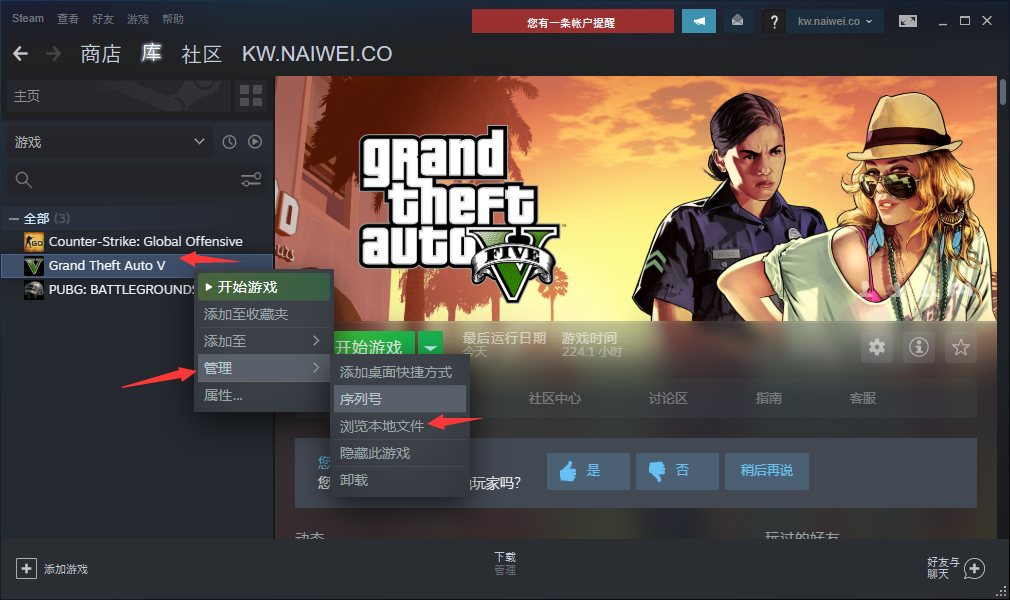
**将下载的JF文件解压并将Installation文件夹里的"Jeff's Menu"文件夹和"xinput1\_3.dll"**

<img src="https://2492540120-files.gitbook.io/~/files/v0/b/gitbook-x-prod.appspot.com/o/spaces%2FvGFcRTH677QmdeZg8dMA%2Fuploads%2FvXFVgxbassU7TFm0ItPn%2F%5DA0U01%603BU%40EB%7DT%5B%606X)9EP.png?alt=media&#x26;token=c1fa63df-e536-4bc4-b8a6-0ff61a248a1a" alt="" width="100%">

<img src="https://2492540120-files.gitbook.io/~/files/v0/b/gitbook-x-prod.appspot.com/o/spaces%2FvGFcRTH677QmdeZg8dMA%2Fuploads%2FPXb915lLb3a9QeRp5nFD%2FQQ%E6%88%AA%E5%9B%BE20230118221719.png?alt=media&#x26;token=166c8ac6-b9b3-49af-9834-5681305998d4" alt="" width="100%">

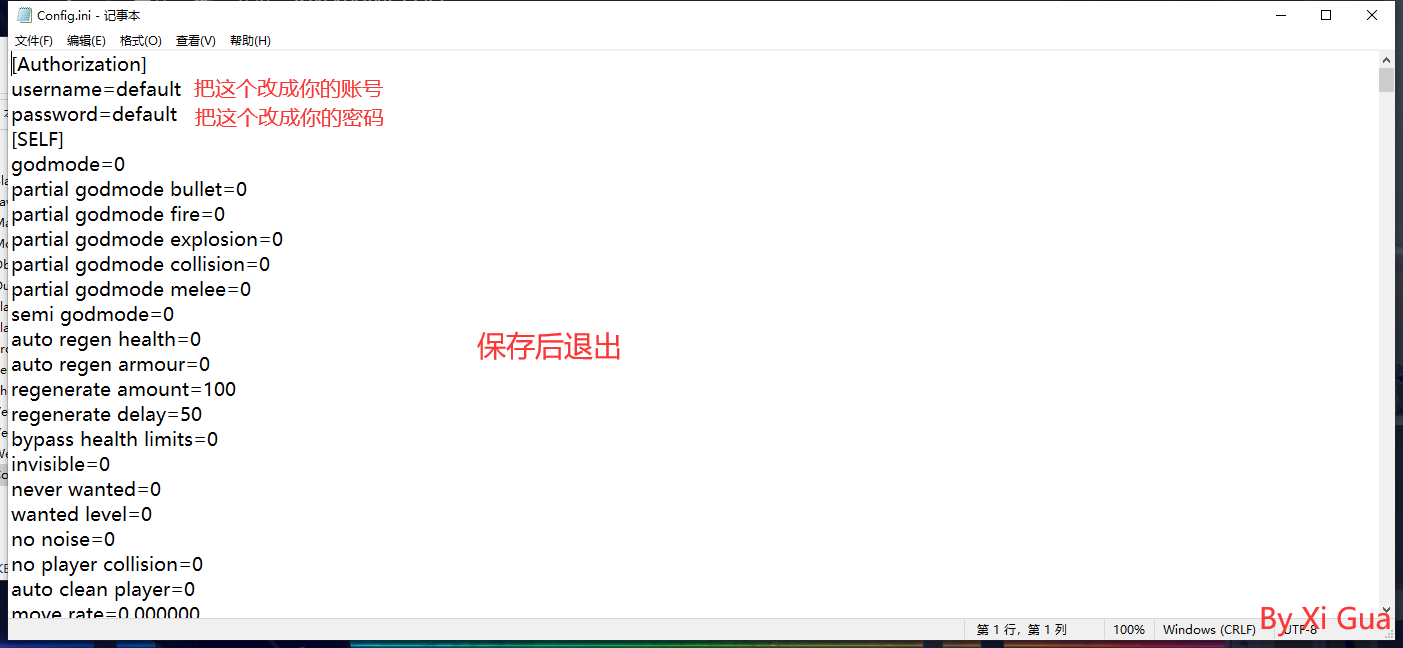
**用记事本打开你已经复制到游戏目录的"Jeff's Menu"文件夹-"Saved Data"文件夹中的Config.ini文件，**

**然后输入你的JF账号密码**

<img src="https://2492540120-files.gitbook.io/~/files/v0/b/gitbook-x-prod.appspot.com/o/spaces%2FvGFcRTH677QmdeZg8dMA%2Fuploads%2F2UNK8EZSgFsHkePV4U1T%2FQQ%E6%88%AA%E5%9B%BE20230118222247.png?alt=media&#x26;token=11ac6507-2dca-4ff4-8cb8-f27c72c921c0" alt="" width="100%">

**然后就可以进入游戏了，进入游戏后呼出菜单**

#### **如若注入失败** <a href="#ru-ruo-zhu-ru-shi-bai" id="ru-ruo-zhu-ru-shi-bai"></a>

> **查看以下教程,注入成功无视此条.**

🛤菜单注入闪退和自崩问题

### **使用** <a href="#shi-yong" id="shi-yong"></a>

**自动加载菜单**

**`*` 呼出/隐藏菜单**

**方向键`↑`** **`↓` 或者小键盘 `8`** **`2` 控制上下**

**方向键`←`** **`→` 或者小键盘 `4`** **`6` 控制左右**

**`回车键/Ent/小键盘5` 确定； `退格键/Back/小键盘0` 返回**


---

# Agent Instructions
This documentation is published with GitBook. GitBook is the documentation platform designed so that both humans and AI agents can read, navigate, and reason over technical content effectively. Learn more at gitbook.com.

## Querying This Documentation
If you need additional information that is not directly available in this page, you can query the documentation dynamically by asking a question.

Perform an HTTP GET request on the current page URL with the `ask` query parameter:

```
GET https://docs.tcmenu.cc/gta5-cai-dan-jiao-cheng/jeff-jie-fu-jiao-cheng/jf-shi-yong-jiao-cheng.md?ask=<question>
```

The question should be specific, self-contained, and written in natural language.
The response will contain a direct answer to the question and relevant excerpts and sources from the documentation.

Use this mechanism when the answer is not explicitly present in the current page, you need clarification or additional context, or you want to retrieve related documentation sections.