# 午夜使用教程

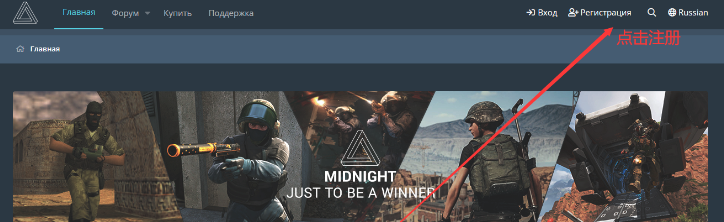
#### 注册账号 <a href="#zhu-ce-zhang-hao" id="zhu-ce-zhang-hao"></a>

{% embed url="<https://midnight.im/join/349770/>" %}

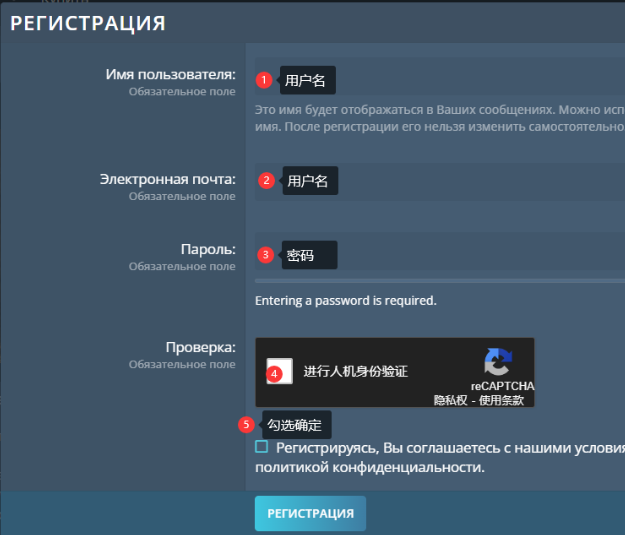
**注册的时候不能有中文跟特殊字符，不然会注册/注入不了**

> ### 第一步，如下图所示 <a href="#di-yi-bu-ru-xia-tu-suo-shi" id="di-yi-bu-ru-xia-tu-suo-shi"></a>

​

<figure><img src="/files/hAfcAdsivjEkml1R7zZz" alt=""><figcaption></figcaption></figure>

<figure><img src="/files/Dinu37Npxz3SkBdVp3z5" alt=""><figcaption></figcaption></figure>

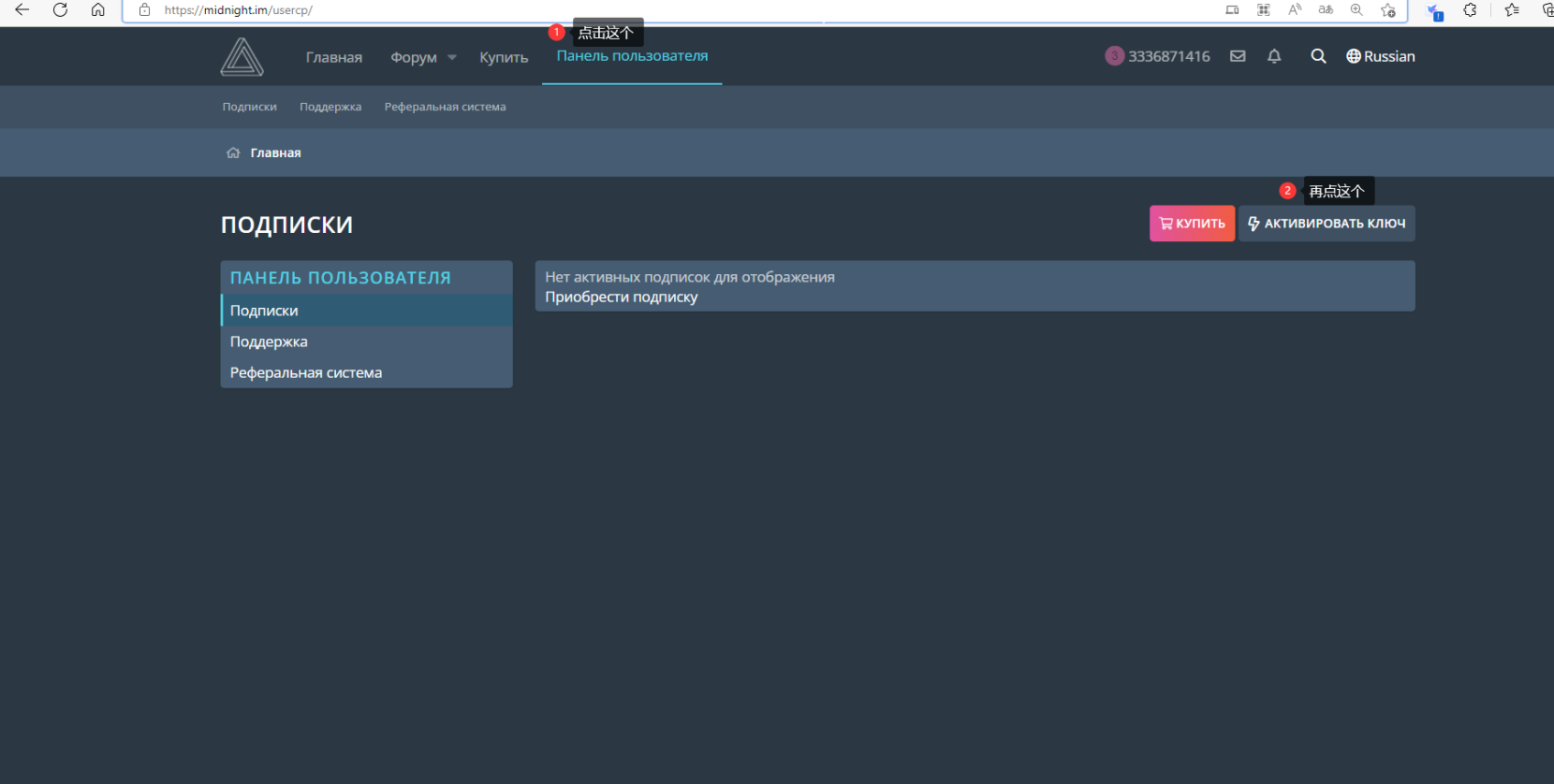
### 激活密钥 <a href="#ji-huo-mi-yue" id="ji-huo-mi-yue"></a>

> **输入你从买家上购买的密钥**

<figure><img src="/files/BdEZw6eoEZnUDEq6r1vt" alt=""><figcaption></figcaption></figure>

### **注入** <a href="#zhu-ru" id="zhu-ru"></a>

**【先关闭退出Steam或Epic，再打开安装器】**

**鼠标右键管理员身份运行安装器**

#### 1.右键管理员打开 注入器 <a href="#id-1.-you-jian-guan-li-yuan-da-kai-xi-gua-an-zhuang-qi" id="id-1.-you-jian-guan-li-yuan-da-kai-xi-gua-an-zhuang-qi"></a>

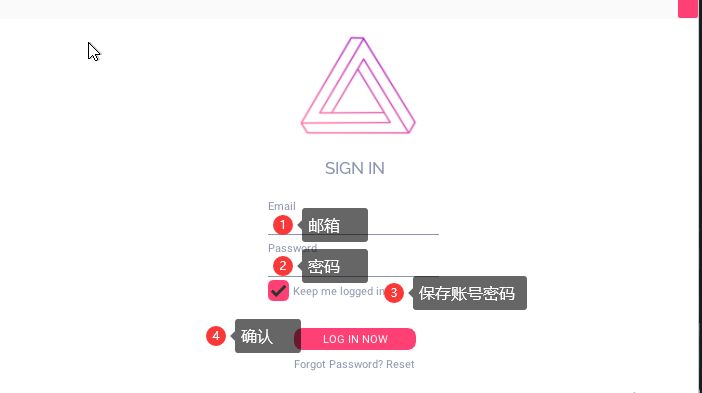
2.启动午夜后输入邮箱和密码

<figure><img src="/files/Vx1kUTB3serwDh0CCpYy" alt=""><figcaption></figcaption></figure>

<img src="https://2492540120-files.gitbook.io/~/files/v0/b/gitbook-x-prod.appspot.com/o/spaces%2FvGFcRTH677QmdeZg8dMA%2Fuploads%2FXmPPslyYXFAFwhFSYnD4%2F2.png?alt=media&#x26;token=3593cff3-8e32-4a57-952e-025dae150fc5" alt="" width="100%">

#### 选择节点,随意选 China | 2 <a href="#xuan-ze-jie-dian-sui-yi-xuan-china-2" id="xuan-ze-jie-dian-sui-yi-xuan-china-2"></a>

<img src="https://2492540120-files.gitbook.io/~/files/v0/b/gitbook-x-prod.appspot.com/o/spaces%2FvGFcRTH677QmdeZg8dMA%2Fuploads%2FUr6uNHN69F1zGxAA1drA%2F3.png?alt=media&#x26;token=beac3199-99b5-458c-98d1-c2fb5fe9ff4e" alt="" width="100%">

注入需要耐心等待，午夜有些地方快有些地方慢

如果实在过于慢，切换China另一个节点，或者开梯子

<img src="https://2492540120-files.gitbook.io/~/files/v0/b/gitbook-x-prod.appspot.com/o/spaces%2FvGFcRTH677QmdeZg8dMA%2Fuploads%2F3rycwTlAqsSUohJy9u0Y%2F4.png?alt=media&#x26;token=21893c14-a629-4cc3-bbb3-9851f0799188" alt="" width="100%">

#### 加载完毕，跳出提示 <a href="#jia-zai-wan-bi-tiao-chu-ti-shi" id="jia-zai-wan-bi-tiao-chu-ti-shi"></a>

#### Now,Please Start GTAV and Finght <a href="#now-please-start-gtav-and-finght" id="now-please-start-gtav-and-finght"></a>

#### 打开GTAV，会自动弹出午夜菜单框 <a href="#da-kai-gtav-hui-zi-dong-dan-chu-wu-ye-cai-dan-kuang" id="da-kai-gtav-hui-zi-dong-dan-chu-wu-ye-cai-dan-kuang"></a>

如下图

<img src="https://2492540120-files.gitbook.io/~/files/v0/b/gitbook-x-prod.appspot.com/o/spaces%2FvGFcRTH677QmdeZg8dMA%2Fuploads%2FPZy87dfzfkxXz8wATLx0%2F5.png?alt=media&#x26;token=10d30538-0839-4c73-8966-665dce800cb6" alt="" width="100%">

**以下窗口不能关，最小化即可**

<img src="https://2492540120-files.gitbook.io/~/files/v0/b/gitbook-x-prod.appspot.com/o/spaces%2FvGFcRTH677QmdeZg8dMA%2Fuploads%2FsWJjyH8NJ1X1abgdLvKw%2F1.png?alt=media&#x26;token=0dd82239-271b-487f-82c3-9335af622242" alt="" width="100%">

#### 呼出隐藏按*INS*,鼠标操控菜单 <a href="#hu-chu-yin-cang-an-ins-shu-biao-cao-kong-cai-dan" id="hu-chu-yin-cang-an-ins-shu-biao-cao-kong-cai-dan"></a>

**有些笔记本键盘可能需要Fn+Ins才可以呼出**

🛤菜单注入闪退和自崩问题

如果注入崩溃闪退请看上篇


---

# Agent Instructions: Querying This Documentation

If you need additional information that is not directly available in this page, you can query the documentation dynamically by asking a question.

Perform an HTTP GET request on the current page URL with the `ask` query parameter:

```
GET https://docs.tcmenu.cc/gta5-cai-dan-jiao-cheng/midngiht-wu-ye-jiao-cheng/wu-ye-shi-yong-jiao-cheng.md?ask=<question>
```

The question should be specific, self-contained, and written in natural language.
The response will contain a direct answer to the question and relevant excerpts and sources from the documentation.

Use this mechanism when the answer is not explicitly present in the current page, you need clarification or additional context, or you want to retrieve related documentation sections.