> For the complete documentation index, see [llms.txt](https://docs.tcmenu.cc/llms.txt). Markdown versions of documentation pages are available by appending `.md` to page URLs; this page is available as [Markdown](https://docs.tcmenu.cc/pubg/des-jiao-cheng/des-she-zhi-xiang-xi-jie-shao.md).

# DES设置详细介绍

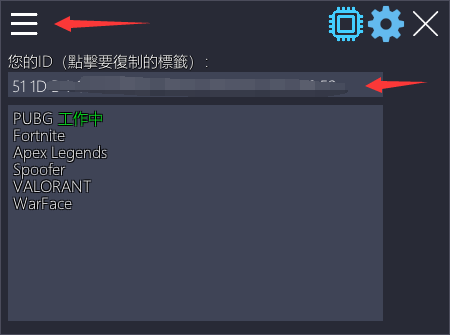
## 1.查看你的ID（不要告诉任何人，除了你的经销商）

<figure><img src="/files/SY8NKoJQUlZmz99Afz3W" alt=""><figcaption></figcaption></figure>

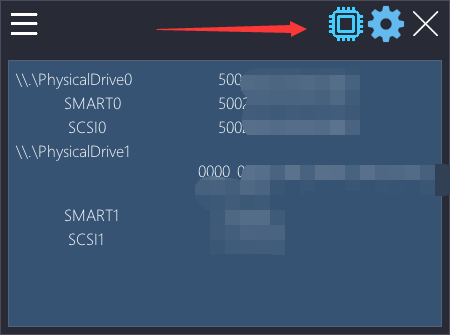
## 2.查看你的机器码（能够在使用Spoofer之前和之后检查您的HWID）

<figure><img src="/files/HpEWLXYbIx9OIoBZmklX" alt=""><figcaption></figcaption></figure>

## 3.启用和设置Spoofer程序

<figure><img src="/files/iTTyrLfm9kdllUAkQU1v" alt=""><figcaption></figcaption></figure>

使用最后一个配置-重复使用以前的HWID Spoofer程序（如果收到封禁，请删除！！）

清除封号数据–此选项可清除以前封禁中的痕迹（验证您的特定游戏）

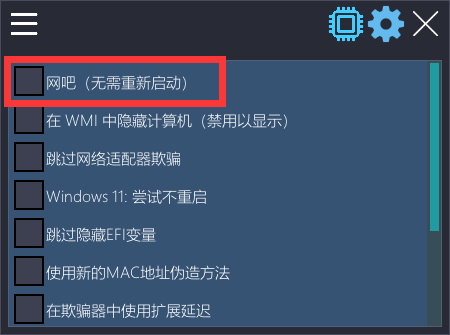
## 4.网吧—一个允许你在里面作弊的选项

<figure><img src="/files/h5RB3OJseKb6YbDwVu0u" alt=""><figcaption></figcaption></figure>

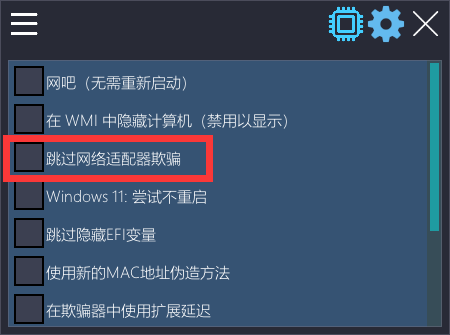
## 5.跳过网络适配器欺骗–此选项允许您跳过MAC地址欺骗（在某些情况下，它可以解决互联网断开连接问题）。

<figure><img src="/files/MlsJTsozen3y8AfGLcoD" alt=""><figcaption></figcaption></figure>

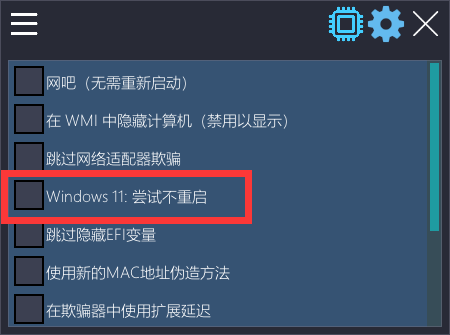
## 6.Windows 11:尝试而不重新启动-允许您跳过使用Windows 11时需要重新启动
<figure><img src="/files/HcIZUNYUX7ZJaOXdEfti" alt=""><figcaption></figcaption></figure>

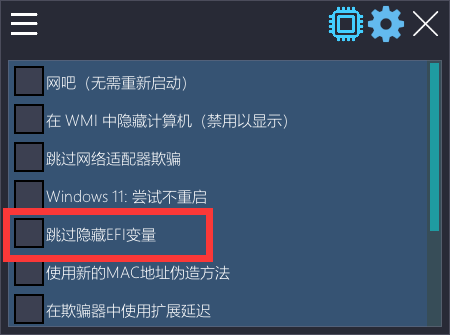
## 7.跳过EFI变量隐藏-附加隐藏（不要随便启用！）

<figure><img src="/files/BDtlI7yd3oRFFvBgQfRi" alt=""><figcaption></figcaption></figure>

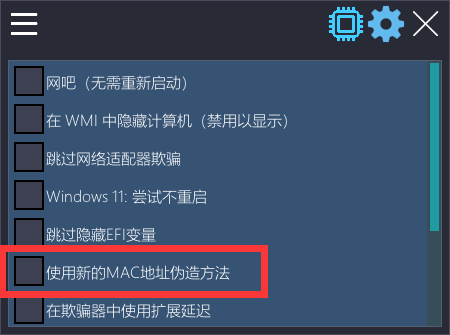
## 8.使用新的MAC欺骗方法——MAC地址欺骗的新版本。

<figure><img src="/files/5NiubiP9meZ3prjuHnXe" alt=""><figcaption></figcaption></figure>

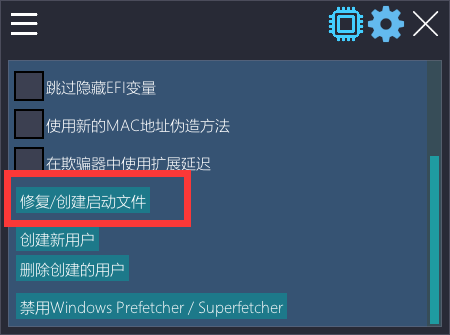
## 9.修复/创建启动文件–帮助解决启动文件的问题

<figure><img src="/files/ywvGRX9ZtZpLjK64NueR" alt=""><figcaption></figcaption></figure>

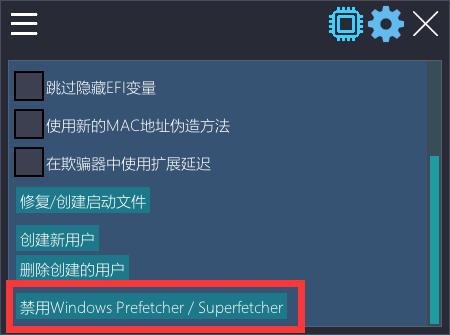
## 10.禁用Windows预读器/超级预读器–禁用Windows优化

<figure><img src="/files/uMIrmx6peYfxe6qqsiiE" alt=""><figcaption></figcaption></figure>

{% hint style="danger" %}
如果出现问题，您需要提供：

1.您的Windows版本（win+r>winver>enter）-屏幕截图。

2.清楚地描述问题的所有细节（你在做什么？什么时候发生的？它持续了多久？-细节越多越好）。

3.游戏模式（有窗口\无边框\全屏）。

4.问题的照片或视频（用手机拍摄）-这非常重要简化了过程。

5.有时可能需要日志（向经销商询问如何创建它）
{% endhint %}


---

# Agent Instructions
This documentation is published with GitBook. GitBook is the documentation platform designed so that both humans and AI agents can read, navigate, and reason over technical content effectively. Learn more at gitbook.com.

## Querying This Documentation
If you need additional information that is not directly available in this page, you can query the documentation dynamically by asking a question.

Perform an HTTP GET request on the current page URL with the `ask` query parameter, and the optional `goal` query parameter:

```
GET https://docs.tcmenu.cc/pubg/des-jiao-cheng/des-she-zhi-xiang-xi-jie-shao.md?ask=<question>&goal=<endgoal>
```

`ask` is the immediate question: it should be specific, self-contained, and written in natural language.
`goal` is optional and describes the broader end goal you are ultimately trying to accomplish on behalf of the user. GitBook uses it to tailor the answer towards what is most useful for that goal.

The response will contain a direct answer to the question and relevant excerpts and sources from the documentation.

Use this mechanism when the answer is not explicitly present in the current page, you need clarification or additional context, or you want to retrieve related documentation sections.