> For the complete documentation index, see [llms.txt](https://docs.tcmenu.cc/llms.txt). Markdown versions of documentation pages are available by appending `.md` to page URLs; this page is available as [Markdown](https://docs.tcmenu.cc/qi-ta-jiao-cheng/za-yi-jiao-cheng/cai-dan-zhu-ru-shan-tui-he-zi-beng-wen-ti.md).
# 菜单注入闪退和自崩问题
请根据你的游戏类型调整,重装系统是最后的方法
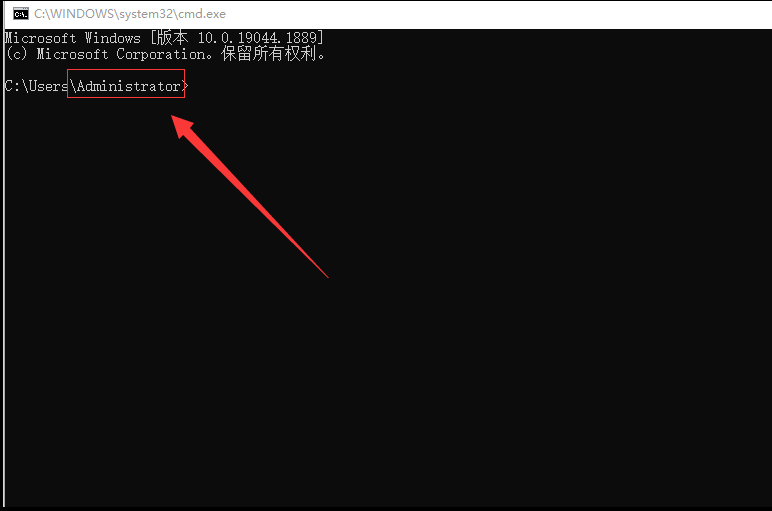
## 第一步,检查系统用户名是否为中文
{% hint style="info" %}
WIN+R,左下角出现运行,输入cmd,进入命令提示框
用户名可以是数字+英文,只要不是中文即可
{% endhint %}
 **然后`WIN`+`R`输入 %appdata% 回车**
**看看以下路径有没有中文**

**如果是****中文****,尝试修改"我的文档"****路径**** ****或者 修改"用户名"为****英文**
**Win7系统修改教程** [**点击查看Win7系统修改教程**](https://zhidao.baidu.com/question/1929174734601453667.html)
**Win10系统修改教程** [**点击查看Win10系统修改教程**](http://www.zhuangjizhuli.net/jiaocheng/6320.html)
**Win11系统修改教程 请查找百度**
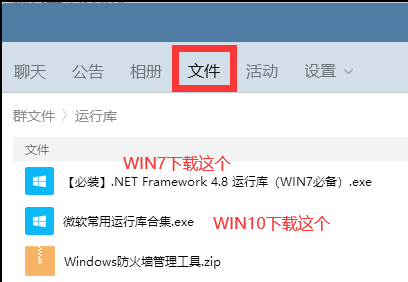
### **售后群下载运行库并安装**
**然后`WIN`+`R`输入 %appdata% 回车**
**看看以下路径有没有中文**

**如果是****中文****,尝试修改"我的文档"****路径**** ****或者 修改"用户名"为****英文**
**Win7系统修改教程** [**点击查看Win7系统修改教程**](https://zhidao.baidu.com/question/1929174734601453667.html)
**Win10系统修改教程** [**点击查看Win10系统修改教程**](http://www.zhuangjizhuli.net/jiaocheng/6320.html)
**Win11系统修改教程 请查找百度**
### **售后群下载运行库并安装**
 ## 第二步,游戏内设置
{% tabs %}
{% tab title="CSGO" %}
**游戏设置**
**图像-屏幕类型:****`窗口化`****/****`无边框`**
{% endtab %}
{% tab title="GTA5" %}
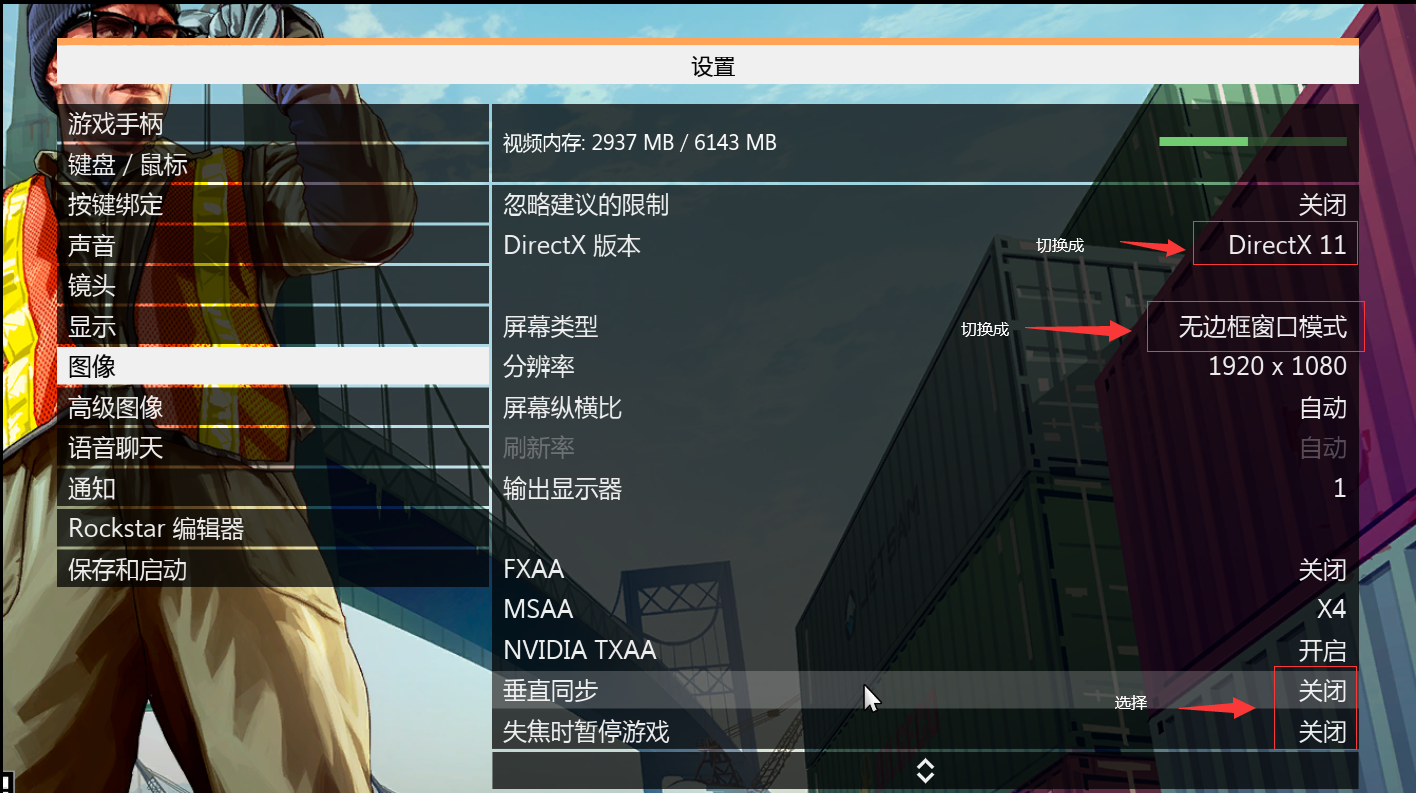
**游戏设置**
**图像-DirectX版本:****DirectX11**
**图像-屏幕类型:****无边框**
**图像-失效暂停关闭**
**图像-垂直同步关闭**
## 第二步,游戏内设置
{% tabs %}
{% tab title="CSGO" %}
**游戏设置**
**图像-屏幕类型:****`窗口化`****/****`无边框`**
{% endtab %}
{% tab title="GTA5" %}
**游戏设置**
**图像-DirectX版本:****DirectX11**
**图像-屏幕类型:****无边框**
**图像-失效暂停关闭**
**图像-垂直同步关闭**
 ## 第三步,卸载杀毒
{% hint style="info" %}
**卸载电脑里的所有`杀毒`软件(**~~**电脑管家 360 鲁大师**~~** 等等)**
**关闭电脑里的`自带杀毒`**
**使用`DX修复工具`修复**
**关闭退出所有覆盖层软件 例如:`GAME++`,`微星小飞机MSI`** **`Afterburner`,`NVIDIA GeForce`等等**
**关闭退出你电脑里的各种调试器 例如:`CE`**
{% endhint %}
## **第四步,加速器问题**
**禁止使用免费加速器**
**雷神/薄荷/鲜牛****等加速器还有所谓的`**加速器盒子`自行尝试,不行就换下列加速器**
***尝试更换加速器 更换加速器模式 更换加速器节点 直到能注入使用为止***
* **UU加速`模式3`**
**迅游加速器`模式3/5`**
**奇游加速器`模式1/4`**
**暴喵加速器/8lag加速器`全匹配美服/新模式美服`(注入战地5/战地1/CSGO菜单/APEX菜单可自行尝试)**
{% endtab %}
{% endtabs %}
## 第三步,卸载杀毒
{% hint style="info" %}
**卸载电脑里的所有`杀毒`软件(**~~**电脑管家 360 鲁大师**~~** 等等)**
**关闭电脑里的`自带杀毒`**
**使用`DX修复工具`修复**
**关闭退出所有覆盖层软件 例如:`GAME++`,`微星小飞机MSI`** **`Afterburner`,`NVIDIA GeForce`等等**
**关闭退出你电脑里的各种调试器 例如:`CE`**
{% endhint %}
## **第四步,加速器问题**
**禁止使用免费加速器**
**雷神/薄荷/鲜牛****等加速器还有所谓的`**加速器盒子`自行尝试,不行就换下列加速器**
***尝试更换加速器 更换加速器模式 更换加速器节点 直到能注入使用为止***
* **UU加速`模式3`**
**迅游加速器`模式3/5`**
**奇游加速器`模式1/4`**
**暴喵加速器/8lag加速器`全匹配美服/新模式美服`(注入战地5/战地1/CSGO菜单/APEX菜单可自行尝试)**
{% endtab %}
{% endtabs %}