> For the complete documentation index, see [llms.txt](https://docs.tcmenu.cc/llms.txt). Markdown versions of documentation pages are available by appending `.md` to page URLs; this page is available as [Markdown](https://docs.tcmenu.cc/war-thunder/fecurity-jiao-cheng/fecurity-yi-nan-za-zheng.md).
# Fecurity疑难杂症
{% tabs %}
{% tab title="1.安全引导(Secure Boot)" %} **确保已禁用安全启动**
**确保已禁用安全启动:**
**以管理员身份打开 powershell**
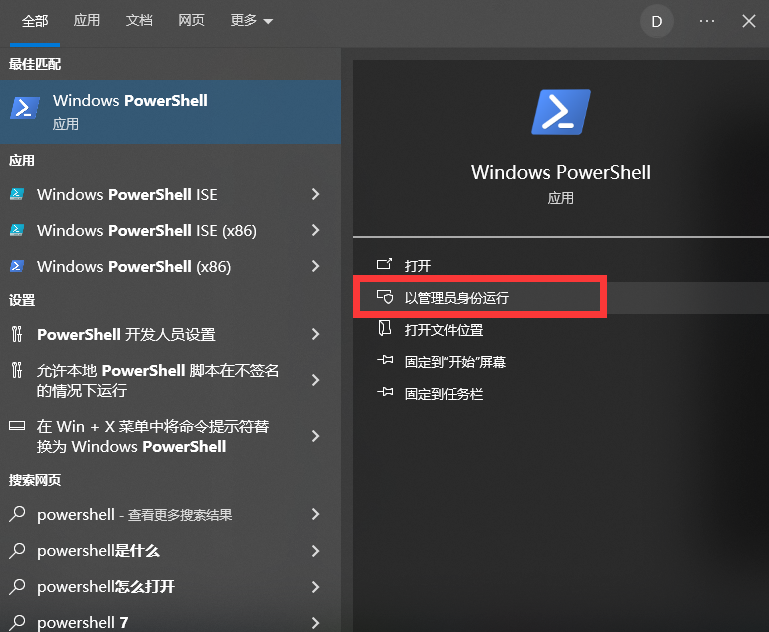 **粘贴命令**
```
Confirm-SecureBootUEFI
```
**按 ENTER 键**
**确认 powershell 返回值 False**
```
PS C:\Windows\system32> Confirm-SecureBootUEFI
False
```
**IF 值:TRUE**
**安全启动已启用,将无法启动**
**关闭 BIOS安全启动**
**BIOS 始终禁用安全启动**
**进入 BIOS。 打开高级设置(高级模式 (F7) 打开 BOOT(BOOT) 小节 打开安全启动分节 此部分可能位于安全部分**
**打开 KEY MANAGMENT(密钥管理)分节 单击清除安全启动密钥 保存 BIOS 设置并重新启动电脑**
{% endtab %}
{% endtabs %}
{% tabs %}
{% tab title="2.启用虚拟化(Enable Virtualization)" %}
**使用 BIOS**
**打开高级设置(高级模式 (F7) 打开 "高级 "部分 找到 INTEL VIRTUALIZATION TECHNOLOGY 选项 将值设为启用 保存 BIOS 设置并重新启动电脑**
{% endtab %}
{% endtabs %}
{% tabs %}
{% tab title="3.如果要启用HyperV " %}
**我们使用 Hyper-V 资源来提高产品的质量和安全性。**
**在不使用管理程序的产品中,我们需要你禁用管理程序**
**如果要启用管理程序 以管理员身份打开命令提示符()cmd.exe 必须以管理员身份打开**\
**输入以下命令:**
```
bcdedit /set hypervisorlaunchtype auto
```
```
DISM /Online /Enable-Feature /All /FeatureName:Microsoft-Hyper-V
```
**重启电脑**
{% endtab %}
{% endtabs %}
{% tabs %}
{% tab title="4.如果要禁用HyperV " %}
**以管理员身份打开命令提示符 (cmd.exe) 必须以管理员身份打开**
**输入以下命令:**
```
bcdedit /set hypervisorlaunchtype off
```
```
DISM /Online /Disable-Feature /All /FeatureName:Microsoft-Hyper-V
```
**重启电脑**
{% endtab %}
{% endtabs %}
{% tabs %}
{% tab title="5.禁用TMP" %}
**与 BIOS 一起工作**
**BIOS 始终禁用 TPM**
**打开高级设置(高级模式 (F7) 查找安全设备支持或可信计算 将值设为禁用 保存 BIOS 设置并重新启动电脑**
{% endtab %}
{% endtabs %}
**粘贴命令**
```
Confirm-SecureBootUEFI
```
**按 ENTER 键**
**确认 powershell 返回值 False**
```
PS C:\Windows\system32> Confirm-SecureBootUEFI
False
```
**IF 值:TRUE**
**安全启动已启用,将无法启动**
**关闭 BIOS安全启动**
**BIOS 始终禁用安全启动**
**进入 BIOS。 打开高级设置(高级模式 (F7) 打开 BOOT(BOOT) 小节 打开安全启动分节 此部分可能位于安全部分**
**打开 KEY MANAGMENT(密钥管理)分节 单击清除安全启动密钥 保存 BIOS 设置并重新启动电脑**
{% endtab %}
{% endtabs %}
{% tabs %}
{% tab title="2.启用虚拟化(Enable Virtualization)" %}
**使用 BIOS**
**打开高级设置(高级模式 (F7) 打开 "高级 "部分 找到 INTEL VIRTUALIZATION TECHNOLOGY 选项 将值设为启用 保存 BIOS 设置并重新启动电脑**
{% endtab %}
{% endtabs %}
{% tabs %}
{% tab title="3.如果要启用HyperV " %}
**我们使用 Hyper-V 资源来提高产品的质量和安全性。**
**在不使用管理程序的产品中,我们需要你禁用管理程序**
**如果要启用管理程序 以管理员身份打开命令提示符()cmd.exe 必须以管理员身份打开**\
**输入以下命令:**
```
bcdedit /set hypervisorlaunchtype auto
```
```
DISM /Online /Enable-Feature /All /FeatureName:Microsoft-Hyper-V
```
**重启电脑**
{% endtab %}
{% endtabs %}
{% tabs %}
{% tab title="4.如果要禁用HyperV " %}
**以管理员身份打开命令提示符 (cmd.exe) 必须以管理员身份打开**
**输入以下命令:**
```
bcdedit /set hypervisorlaunchtype off
```
```
DISM /Online /Disable-Feature /All /FeatureName:Microsoft-Hyper-V
```
**重启电脑**
{% endtab %}
{% endtabs %}
{% tabs %}
{% tab title="5.禁用TMP" %}
**与 BIOS 一起工作**
**BIOS 始终禁用 TPM**
**打开高级设置(高级模式 (F7) 查找安全设备支持或可信计算 将值设为禁用 保存 BIOS 设置并重新启动电脑**
{% endtab %}
{% endtabs %}